The Lolly Font: A Sweet Script for Makers
There is a specific kind of quiet magic that happens in the studio when a design finally clicks. I was sitting at my desk last Tuesday, surrounded by rolls of kraft paper, spools of twine, and half-finished candle labels. I had been struggling with the typography for a new line of vanilla-bean scented soy candles. The scent was warm and nostalgic, but the fonts I tried felt either too stiff or too messy. Then I loaded The Lolly. As soon as those thick, curvy letters appeared on my screen, the mood shifted. It wasn’t just text anymore; it was personality. It was the visual equivalent of the scent itself: rich, inviting, and undeniably charming.
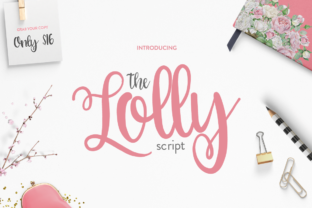
For those of us who spend our days creating tangible goods, whether it’s handmade soaps, printable planners, or boutique clothing, finding the right typeface is often the hardest part of the process. We aren’t just designing words; we are designing feelings. The Lolly, available from Script Amp, is a thick script font that understands this assignment perfectly. With its bold strokes and playful yet elegant curves, it bridges the gap between professional polish and handmade warmth. It is not just a font; it is a tool that helps translate the care we put into our crafts into the visual language our customers see first.
Bringing Personality to Product Labels
One of the most immediate applications I found for The Lolly was in packaging design. If you sell physical products, you know that the label is your silent salesman. It has to catch the eye on a crowded shelf or in a thumbnail image online. Because this font is a thick script, it holds its own against busy backgrounds. I tested it on a matte black label for a small batch of artisanal jams. The contrast was striking. The white lettering popped with a vibrant energy that thinner, more delicate scripts simply couldn’t achieve. It felt substantial, like the product inside.
This thickness is crucial for readability, especially when dealing with small formats like sticker sheets or boutique tags. When I shrink designs down for circular stickers, fine lines often disappear or look jagged when printed. The Lolly maintains its integrity even at smaller sizes, making it an excellent choice for product tags, seal stickers, and thank-you notes included in shipments. It ensures that your brand name or product title remains legible and impactful, regardless of the scale.
Elevating Wedding and Event Stationery
Beyond product packaging, this typeface shines in the world of event stationery. I recently worked on a mockup for a rustic-chic wedding invitation suite. The couple wanted something that felt modern but still retained a hand-lettered charm. The Lolly was perfect for the couple’s names on the main invitation. Its generous swashes and unique glyphs added a layer of sophistication without feeling overly formal or stuffy. When paired with a clean, simple sans serif font for the details like date, time, and location, the design felt balanced and easy to read.
This font is also a dream for wedding welcome boards and seating charts. These items are often viewed from a distance, so the bold weight of the script ensures that guests can read the information easily. Whether you are designing digital templates for Etsy sellers or printing custom invitations for local clients, The Lolly offers a versatility that few other script fonts possess. It works equally well for birthday parties, baby showers, and bridal showers, adapting its mood based on the colors and graphics you pair it with.
Perfect for Digital Downloads and Printables
As a creator of digital downloads, I am always looking for fonts that look great on screen and print beautifully at home. The Lolly excels in this arena. I used it to create a set of printable wall art quotes for a nursery collection. The playful nature of the font matched the whimsical illustrations perfectly. Because the font comes with 100 stunning unique glyphs, I was able to add subtle variations to different prints, ensuring that each piece felt unique while maintaining a cohesive collection. This variety is a huge asset for creators who want to offer bundled sets or customizable options to their customers.
For planner enthusiasts and journal lovers, this font adds a touch of joy to header pages and monthly covers. It is thick enough to be traced or cut with ease, making it a favorite among Cricut and Silhouette users. If you are creating vinyl decals for laptops, water bottles, or tote bags, the connected letters and sturdy strokes of The Lolly make for durable, long-lasting designs that don’t tear easily during application.
Typography Tips for Best Results
To get the most out of this premium font, consider how you pair it. Because The Lolly is a display font with a strong personality, it works best when it is the star of the show. Use it for titles, names, short phrases, and decorative wording. Avoid using it for long paragraphs of body text, as the intricate connections can become hard to read in dense blocks. Instead, pair it with a neutral sans serif or a classic serif font for supporting text. This contrast creates a professional hierarchy that guides the viewer’s eye naturally through your design.
When using cutting machines, always check your settings. The thick lines of this script font are forgiving, but ensuring your blade depth is correct will prevent any tearing of the vinyl or paper. For printed materials, high-resolution files are key. Make sure you are using the correct file format for your project, whether it is OTF or TTF for desktop publishing, or web fonts for online previews.
Building a Consistent Brand Identity
Ultimately, choosing a font like The Lolly is about building a consistent brand identity. When customers see that distinctive, thick script on your Instagram posts, your packaging, and your website, they begin to recognize your brand instantly. It creates an emotional connection, signaling that your products are crafted with care and attention to detail. In a market saturated with generic designs, having a unique typographic voice can set your shop apart.
Before you start selling products featuring this font, always review the commercial license included with your purchase from Script Amp. Understanding the terms for physical products, digital templates, and merchandise ensures that you can use your design assets with confidence. Whether you are making mugs, shirts, signs, or seasonal holiday tags, knowing your licensing rights allows you to focus on what you do best: creating beautiful, handmade items that bring joy to others.
In the end, The Lolly is more than just a collection of letters. It is a creative partner that helps bring your vision to life. From the first sketch to the final packaged product, it adds a layer of warmth and professionalism that resonates with customers. So, the next time you are stuck on a design, give this thick script a try. You might just find, as I did, that it brings the perfect touch of sweetness to your craft.